
Events

Manage Bundle Quantities for Event Registration

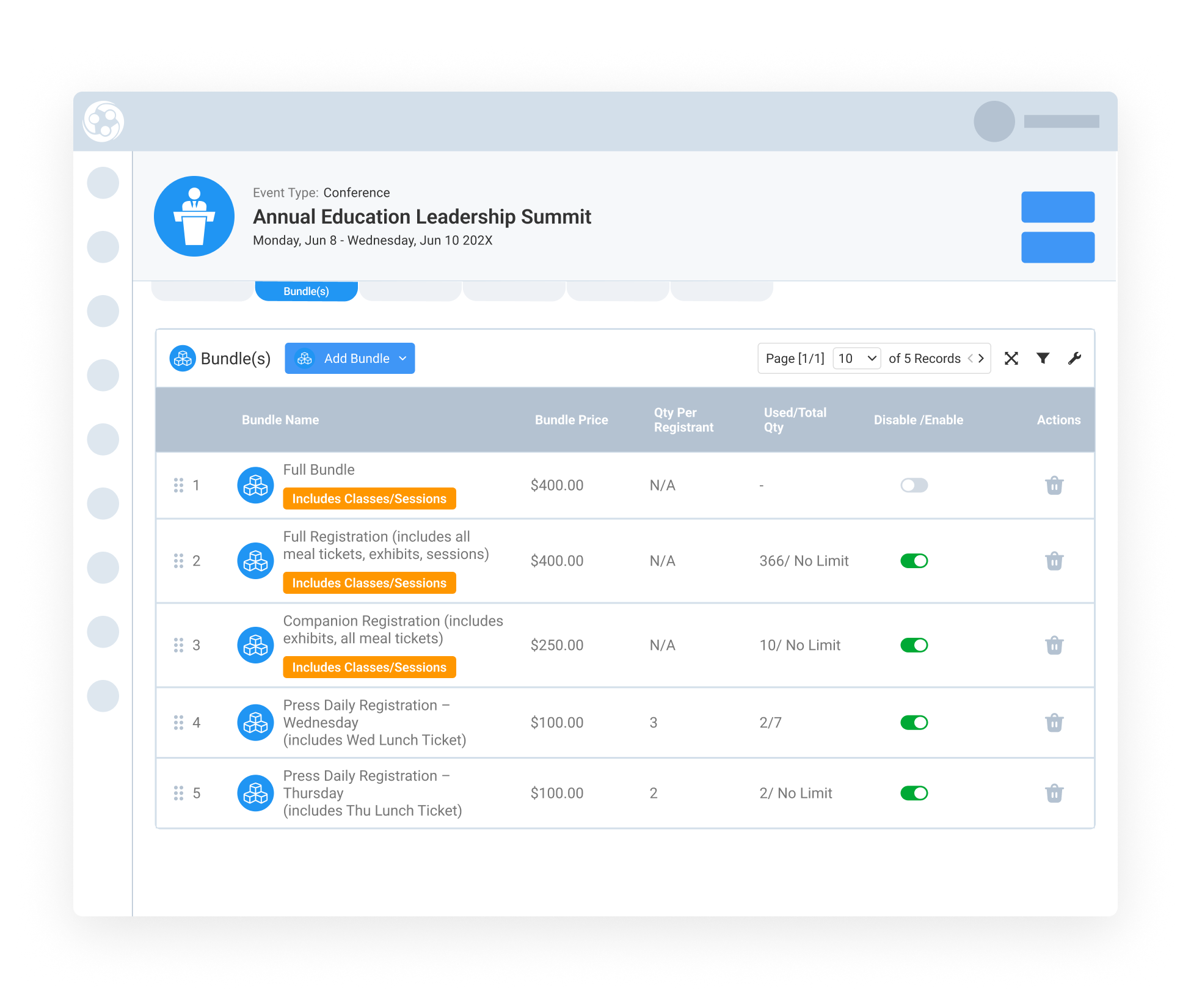
Event bundles help associations package registration options together, such as meal tickets, daily passes, exhibit passes, sponsorship packages, merchandise, classes, or sessions. Some bundles only need to be selected once, while others may need to be purchased in multiple quantities by the same registrant.

Bundle Quantity Support gives teams more flexibility when selling reusable bundle items. Registrants can purchase more than one unit when appropriate, while Engagifii still protects class and session rules, inventory limits, invoice accuracy, reporting, and the overall registration lifecycle. 


bundle quantity

Make Multiple Bundle Purchases Easier

Make Multiple Bundle Purchases Easier

Some event options are reusable and may need to be purchased more than once. A registrant may need multiple meal tickets, daily passes, exhibit passes, sponsorship packages, or merchandise items as part of the same registration.

With Bundle Quantity Support, admins can allow multiple quantities for bundles that do not include classes or sessions. This gives registrants a cleaner way to select the right quantity without creating duplicate bundle options or requiring manual workarounds.

This helps associations sell quantity-based registration items more naturally while keeping the registration experience simple.


Control Quantity Per Registrant and Total Inventory

Control Quantity Per Registrant and Total Inventory

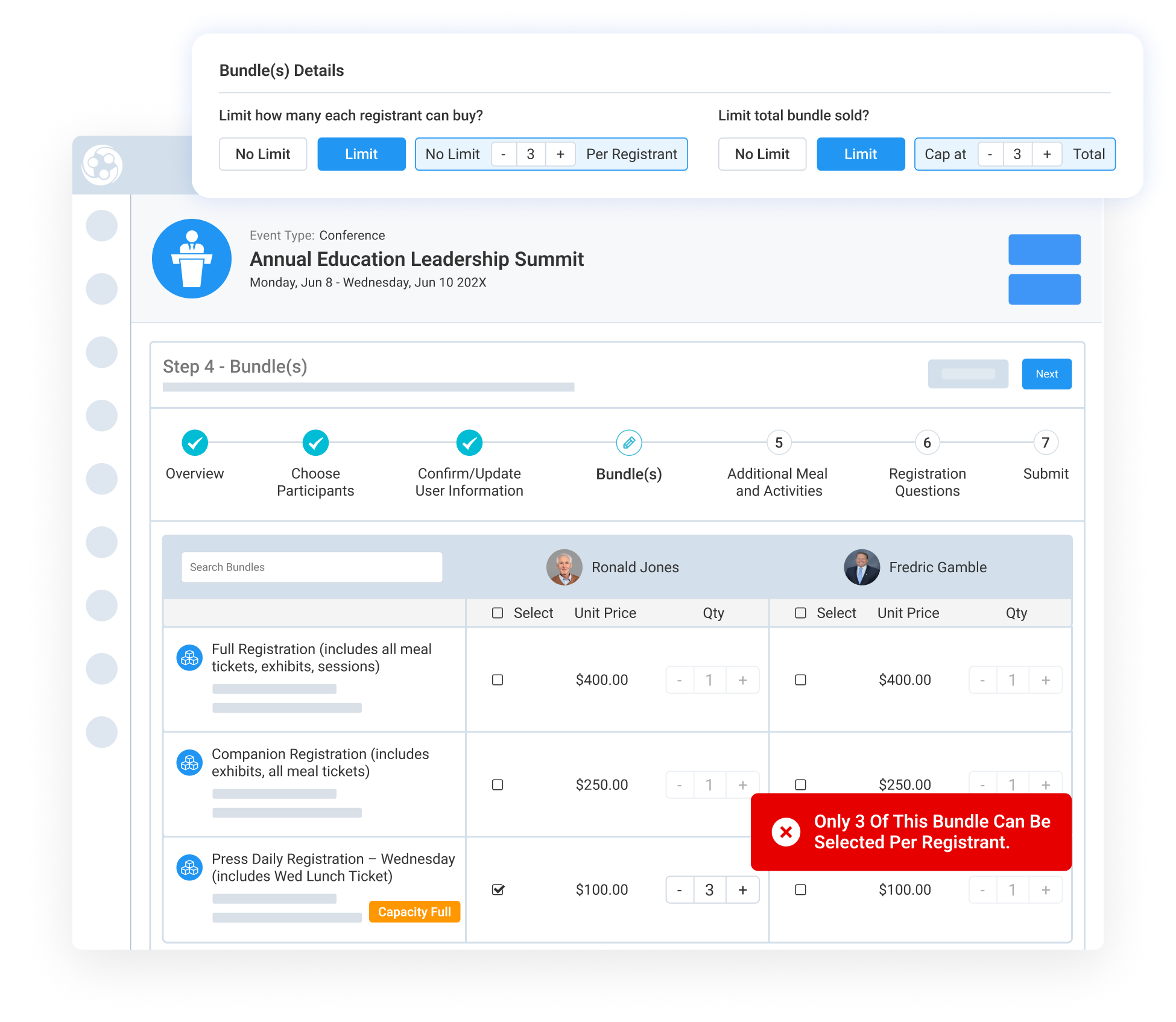
Admins can manage bundle quantity using two independent controls: Quantity Per Registrant and Total Bundles Available. Quantity Per Registrant controls how many units one registrant can purchase, while Total Bundles Available controls the overall inventory available across the event.

Each setting can be configured as limited or unlimited. For example, an admin may allow each registrant to purchase up to three meal tickets while limiting the total number of meal tickets available for the event to 100.

During registration, Engagifii validates both limits before the registrant can continue. If the registrant selects more than the allowed quantity or the bundle has reached its event capacity, a clear message pops up on the screen so they understand why they cannot add more.

Prevent Duplicate Class and Session Purchases

Prevent Duplicate Class and Session Purchases

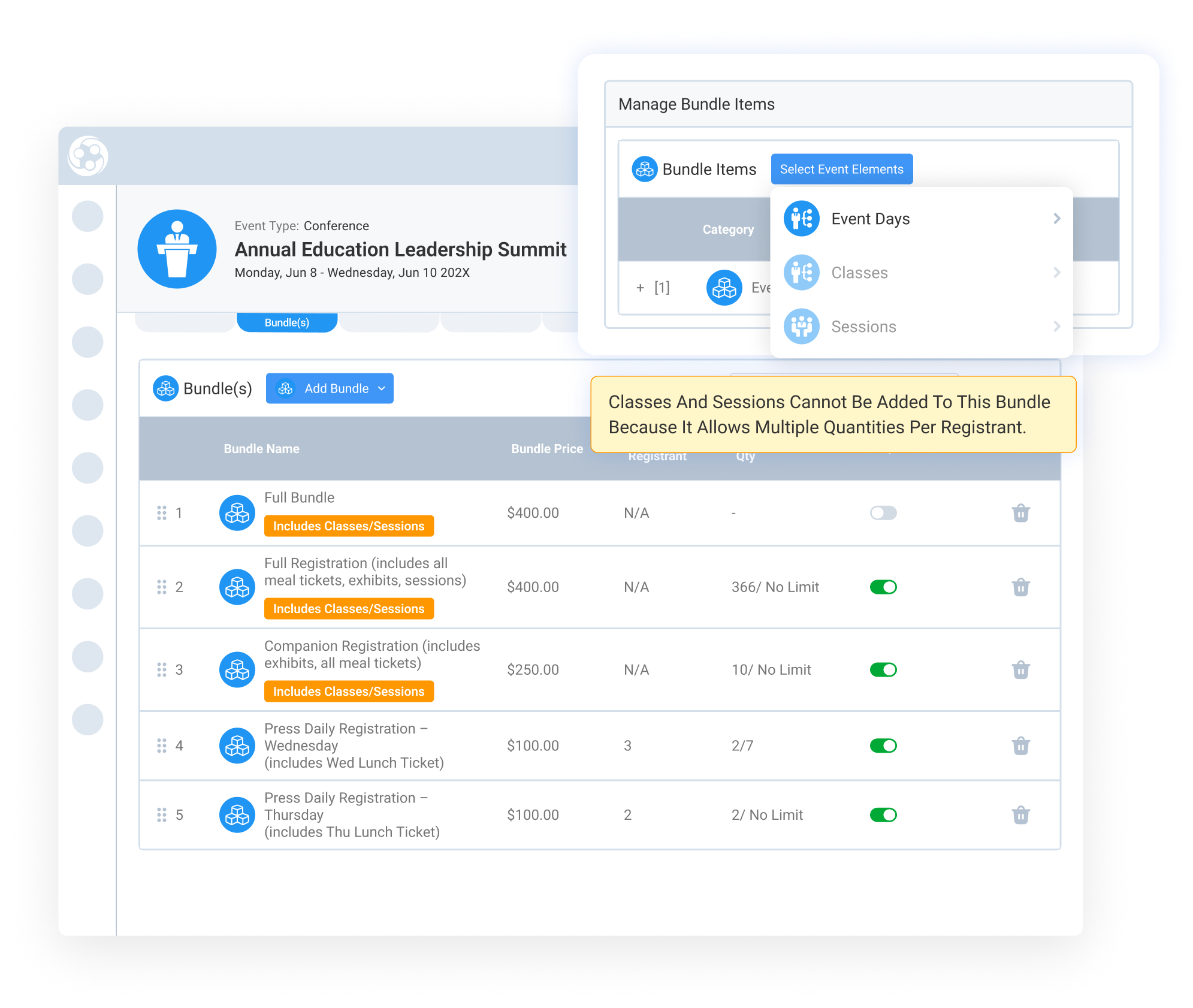
Bundles that include classes or sessions follow stricter rules. If a bundle contains one or more classes or sessions, the quantity is automatically locked to one because a registrant cannot be registered into the same class or session more than once.

Even when the per-registrant quantity is locked to one, admins can still set the total number of bundles available for inventory control.

By separating reusable bundles from class or session-based bundles, Engagifii gives teams flexibility without disrupting the rules that keep registration accurate.


159787727717 []

Related Solutions

160221054112 []

Related Features

Simplify Group Event Payments With Split Payments

Group event registrations do not always have one payer. A county, school district, or organization may pay for its commissioners, board members, or staff…

Create and Send Custom Certificates From Engagifii

Associations often need to recognize participation, attendance, training completion, or other achievements. Instead of creating certificates manually or…

Review Event Details With Registration Overview

Event registration setup often includes many moving parts, from registration dates and public links to pricing, sessions, bundles, exhibitor settings,…

Copy Events and Reuse Previous Event Configurations

Recreating the same conference, training program, or annual event year after year can be time-consuming, especially when sessions, classes, exhibitor…

Organize Relationship Resources with the Library

Managing important documents related to your members, vendors, speakers, and other people and organizations can quickly become difficult when files are…

Monitor Participation and Revenue with the Event Registration Report

Event teams need to constantly keep an eye on trends throughout the registration cycle: How many people have registered? Which organizations are…

Smart Fee Policies Help Automate Event Cancellations and Modifications

Managing cancellations and registration changes doesn’t have to be manual or inconsistent. With Engagifii’s policy-based fee system, your association can…

Register Groups of People for an Event

Many member organizations rely on a designated member representative, such as a board secretary, clerk, or administrative assistant, to register multiple…

Manage Your Event and Class Venues

Every class or event has to happen somewhere. That "SOMEWHERE" is a venue. Once you find venues that work for you, you're probably going to use it over…

Generate Event Registration Links

Not every registrant fits the same mold, and your registration process shouldn’t either. With Engagifii’s Registration Links tool, you can guide different…