Events

Managing Exhibitor Booth Registration Through Booth Preferences

When direct selection isn’t the right fit for event registration, Engagifii offers a guided booth registration process using preference-based requests. Exhibitors review the event booth map, rank their preferred booths, and complete their registration flow, including selecting sponsorships, uploading documents, and submitting payment, just as smoothly. The booth assignment is finalized by an admin later, allowing for strategic placement while offering a seamless registration experience to exhibitors.


Booth Reg - Preference

Request Booths Based on Preferences-1

Request Booths Based on Preferences

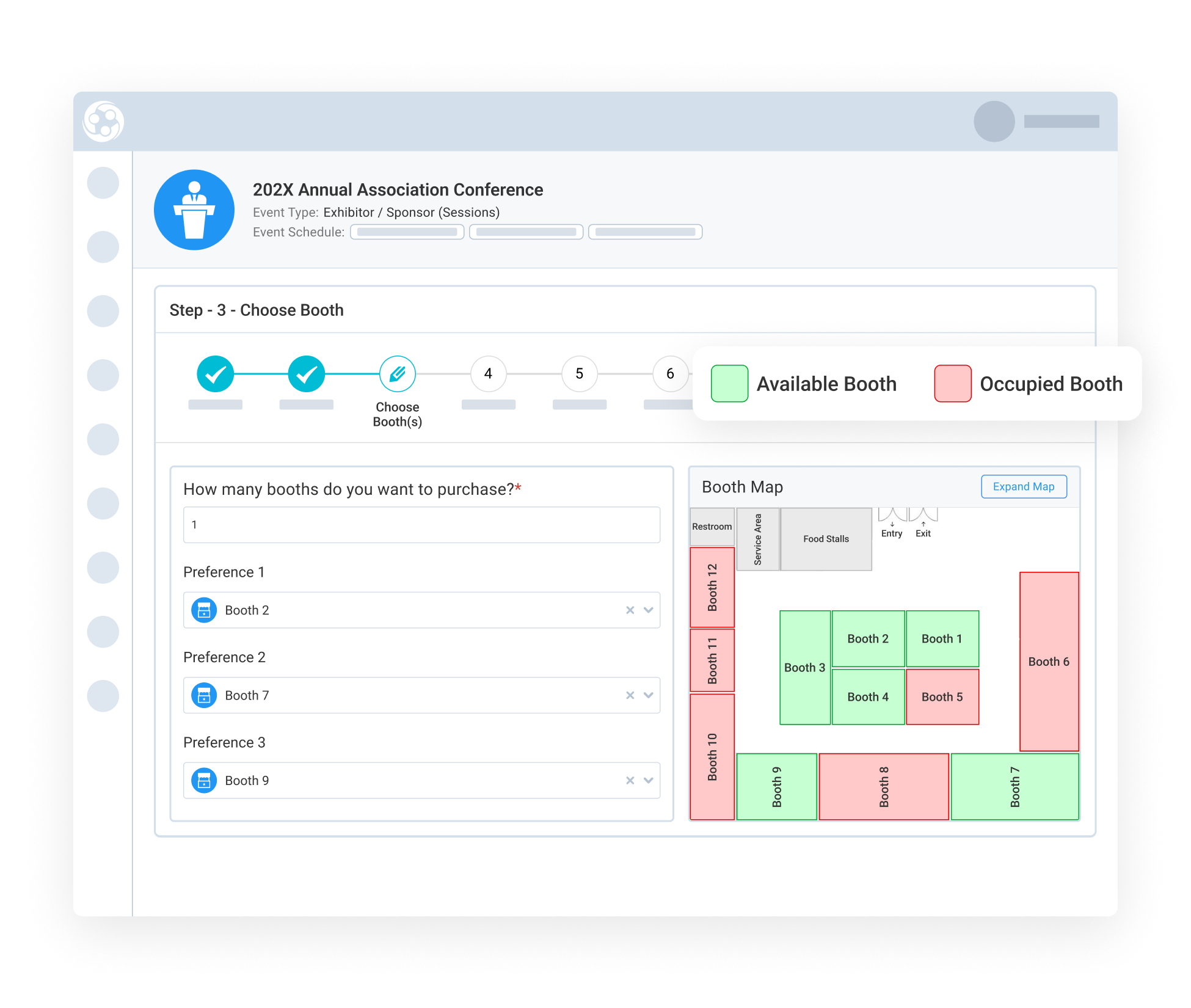
Instead of committing to a specific booth upfront, exhibitors select two or more preferred booth options during registration. This gives them a voice in placement while allowing your team to manage availability and layout constraints behind the scenes.

Exhibitors review event details, verify their organization, and select ranked booth preferences using a color-coded map that clearly shows availability. Once submitted, the registration moves forward with a “Booth Assignment Pending” status, allowing exhibitors to complete their registration without waiting for immediate assignment.

Assign Booths, Finalize Billing, and Notify the Right People (3)

Assign Booths, Finalize Billing, and Notify the
Right People

After reviewing exhibitor preferences, admins assign final booth locations based on availability and event strategy. This step converts preference data into confirmed booth assignments.

Administrators then complete the configuration by selecting whether the exhibitor should pay immediately or be billed later, and by choosing which contacts receive invoice and payment notifications. Once saved, the booth is officially assigned and financially confirmed.


Make Booth Availability Instantly Clear on the Map-3

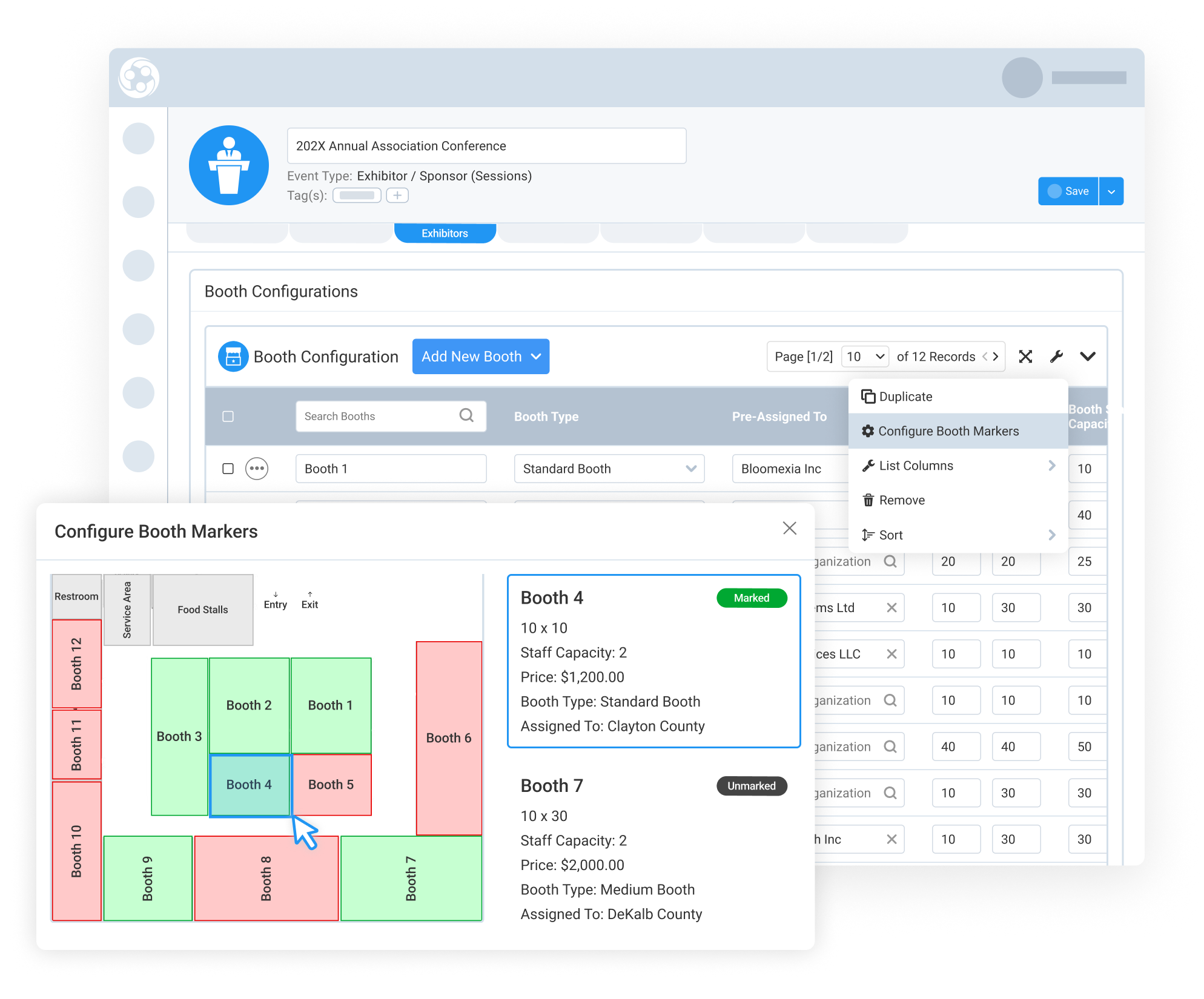
Mark Booth Locations on the Event Floor Map

Administrators visually place booths on the event floor plan using the Configure Booth Markers tool. By dragging and positioning markers directly on the PDF booth map, administrators define exact booth locations tied to each booth record.

Once published, the map becomes the single source of truth for booth availability and placement. This visual consistency reduces confusion, supports accurate planning, and ensures exhibitors see a layout that reflects how the event will actually be set up.

159787727717 []

Related Solutions

160221054112 []

Related Features

Interactive Booth Map Making Booth Selection Easy

Choosing the right booth location can make a meaningful difference in an exhibitor’s event experience, ROI, and likelihood to come back. Engagifii’s…

Managing Exhibitor Booth Registration Through Direct Purchase

Engagifii makes it simple for your exhibitors to register their organization and secure their preferred booth in one seamless process. Whether they’re…

Register Groups of People for an Event

Many member organizations rely on a designated member representative, such as a board secretary, clerk, or administrative assistant, to register multiple…

Manage Your Event and Class Venues

Every class or event has to happen somewhere. That "SOMEWHERE" is a venue. Once you find venues that work for you, you're probably going to use it over…

Modify and Cancel Exhibitor Registrations with Confidence

As events evolve, so do exhibitor needs. Engagifii gives administrators the power to flexibly modify or cancel exhibitor registrations without disrupting…

Generate Event Registration Links

Not every registrant fits the same mold, and your registration process shouldn’t either. With Engagifii’s Registration Links tool, you can guide different…

Generate Name Badges for Events

Effortlessly Create and Print Custom Name Badges for Your Event Engagifii makes it easy to generate professional name badges for your event participants.…

Seamless Exhibitor Management for Your Events

Effortlessly manage exhibitor registrations and booth assignments with Engagifii’s advanced exhibitor management capabilities. Whether you're coordinating…