
Revenue

Streamline Bulk Payment Processing with Payment Batches

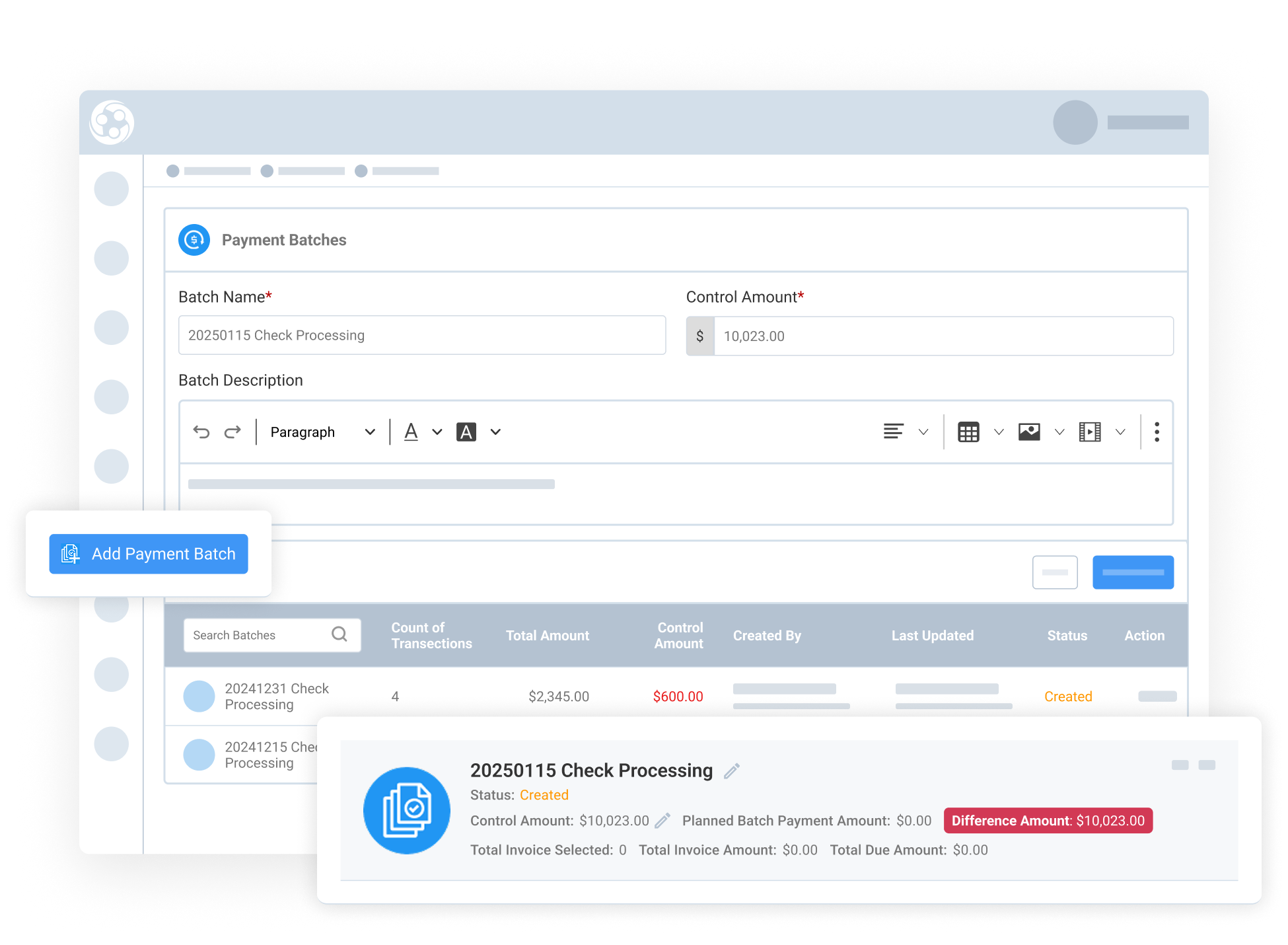
Managing payments across multiple invoices can quickly become time-consuming, especially when organizations send multiple checks to cover several outstanding balances. Payment Batches in Engagifii allow your team to apply payments across multiple invoices in one streamlined workflow. Instead of recording payments one by one, your accounting team can process them all at once, saving time, reducing manual effort, and minimizing errors.

Payment Batches

Apply One Payment Across Multiple Invoices

Apply One Payment Across Multiple Invoices

When members or exhibitors send many payments for multiple invoices, Payment Batches let your team handle everything in one place. Instead of opening each invoice individually, admins can:

  • Create a batch for the received payment

  • Apply the total amount across them in one flow

  • Select all relevant invoices

This eliminates repetitive steps and makes reconciliation much faster, especially when dealing with high volumes of payments.


Reduce Manual Work with Smarter Payment Entry

Reduce Manual Work with Smarter Payment Entry

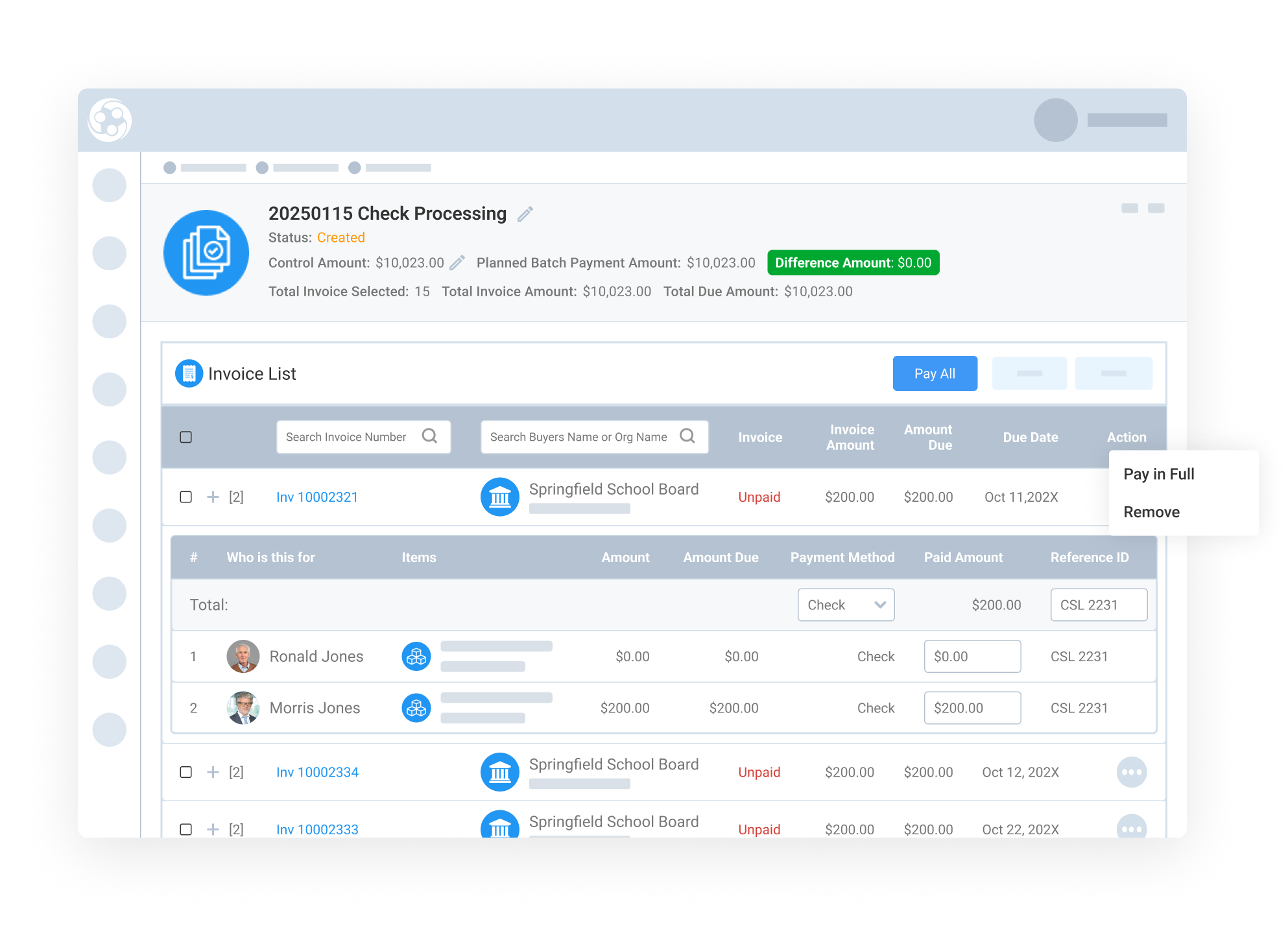
Payment Batches are designed to make payment entry faster and more intuitive for your accounting team. As payments are applied:

  • Payment amounts can be distributed across invoices efficiently

  • Reference details like check numbers can be entered once and reused

  • Totals update in real time, helping your team stay aligned with the received amount

This keeps the process fast, consistent, and easier to manage, especially when handling multiple checks or large batches.

Stay Accurate with Built-In Balancing and Verification

Review and Verify Before Creating the Batch

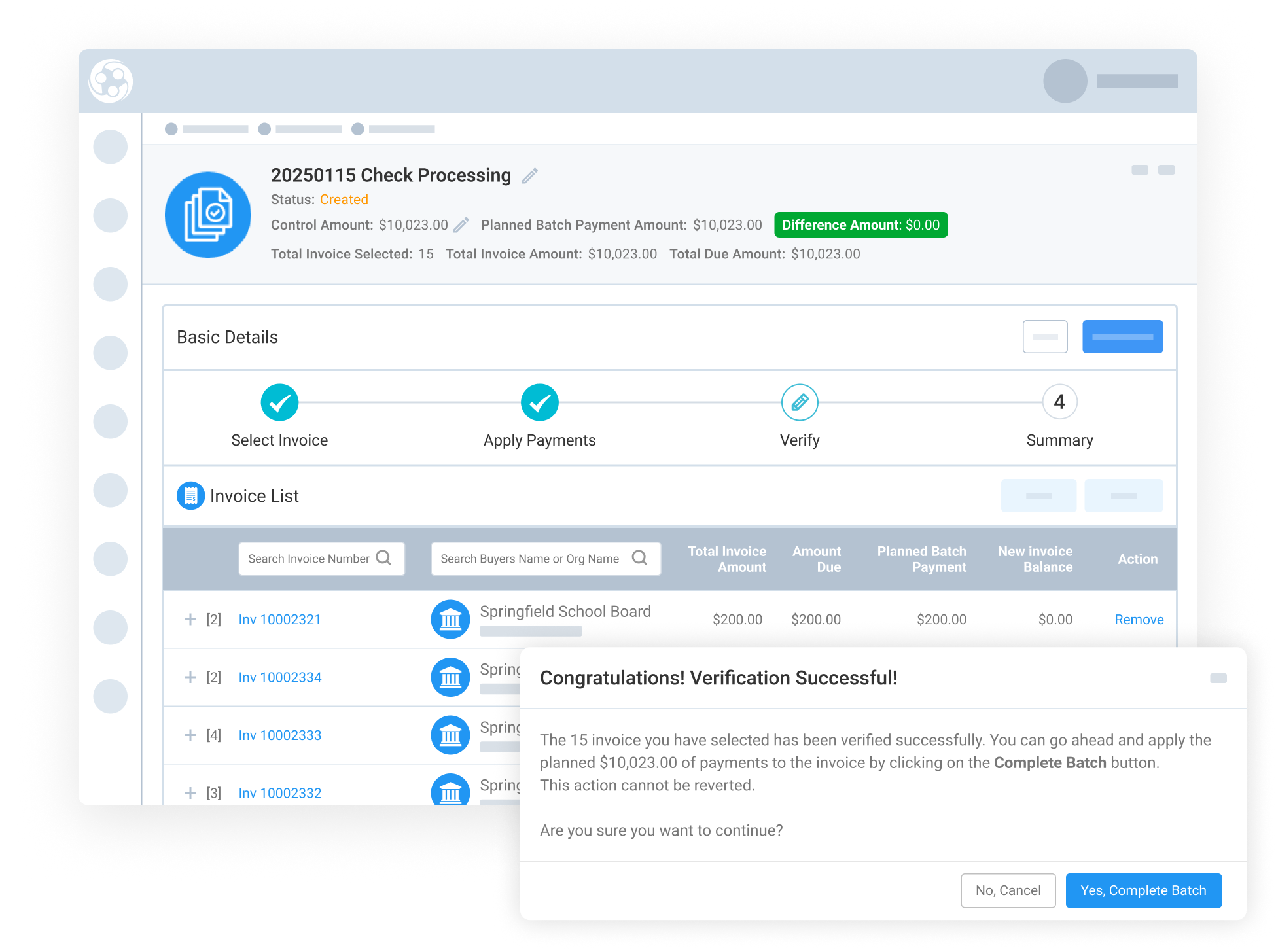
Before creating the batch, Engagifii gives your team full visibility into every selected invoice so nothing is missed or applied incorrectly. Admins can:

  • Review and verify all selected invoices, expanding each one to check detailed line items if needed

  • Confirm totals are accurate, ensuring the planned payment matches the control amount in real time

  • Proceed through a confirmation pop-up, which clearly summarizes the action before completion

This step helps catch discrepancies and ensures every batch starts on a solid, verified foundation.

Confirm and Complete the Batch with Clear Status

Confirm and Complete the Batch with Clear Status

Once everything is verified, Engagifii guides admins through a final confirmation step to safely complete the process. Admins can:

  • Finalize the batch in one step, applying payments across all selected invoices

  • Track completion instantly, as the batch status updates to Completed for easy reference

This final step provides clarity, accountability, and a clean audit trail so your team always knows what’s processed and when.

159787727717 []

Related Solutions

160221054112 []

Related Features

Understand Your Revenue with the Booked Revenue Report

Engagifii’s Booked Revenue Report is designed for accounting and finance teams who need a reliable, transparent view of revenue that has been invoiced.…

Export Transaction Line Items for Clean, Filtered, and Actionable Data

Engagifii’s Line Item Export empowers finance and operations teams with a reliable, high-performance tool for extracting granular transaction-level data…

Send Invoice Reminders in Real Time

Keeping up with overdue invoices can be challenging without the right tools in place. Engagifii’s invoice reminder feature allows your team to efficiently…

Control Payments in Your Registration Workflow

Take control over how registration payments are managed within your organization. Engagifii’s "Registration Payment Control" feature empowers you to…

Quickly Process Payment Batches

Managing multiple payments doesn't have to be tedious. Engagifii's payment batch processing feature empowers finance and accounting teams to quickly and…

Seamlessly Integrate Your Payment Gateway with Engagifii

Engagifii makes it simple to connect your existing payment gateway so you can securely process payments while maintaining complete control over your…

Map General Ledger Accounts to Your Classes

Managing finances for educational or training classes is crucial, and now you can streamline this process by mapping General Ledger (G/L) accounts…

Accounting Transaction Line Item Export

Managing financial data requires efficiency and clarity. The Accounting Transaction Line Item Export capability empowers users to generate detailed…

Map General Ledger Accounts to Your Event Items

Effortlessly associate event items with your General Ledger (G/L) accounts, ensuring your revenue is tracked accurately and mapped to the appropriate…